Disclosure: The author maintains langchain-age.
TL;DR: LangGraph’s
PostgresSaver(checkpoints) +PostgresStore(long-term memory) + langchain-age’sAGEGraph(knowledge graph) +AGEVector(vector search) can all run on the same PostgreSQL instance. One DB, one connection string, one pg_dump. This post builds an agent that grows a knowledge graph through conversation.
Table of contents
Open Table of contents
- Series
- What You’ll Be Able to Do
- The Problem: How Many Databases Does an AI Agent Need?
- Prerequisites
- Architecture: Component Roles
- Step 1: Shared Connection Setup
- Step 2: LangGraph Checkpoint Setup
- Step 3: LangGraph Long-Term Memory Setup
- Step 4: Build a Knowledge-Growing Agent
- Step 5: Run the Agent
- What Happens Inside PostgreSQL
- Actual Resource Usage
- Operational Benefits
- Lessons Learned
- Production Checklist
- FAQ
- Can I use langchain-age without LangGraph?
- Won’t concentrating load on one PostgreSQL be a problem?
- Won’t the checkpoint table grow unbounded?
- What’s the difference between LangGraph’s PostgresSaver and PostgresStore?
- Can I join AGE graph data and pgvector results in the same query?
- Is langgraph-checkpoint-postgres compatible?
- Key Takeaways
- Series Summary
- Related Posts
- External References
Series
This is Part 5 (final) of the langchain-age series.
- GraphRAG with Just PostgreSQL — Overview + Setup
- Neo4j vs Apache AGE Benchmark — Performance Data
- Mastering Vector Search — Hybrid, MMR, Filtering
- Building a GraphRAG Pipeline — Vector + Graph Integration
- Full AI Agent Stack on One PostgreSQL (this post)
What You’ll Be Able to Do
- Set up LangGraph’s
PostgresSaverandPostgresStoreon the same PostgreSQL, separating conversation state from long-term memory. - Wire langchain-age’s
AGEGraph+AGEVectortools into a LangGraph agent that incrementally builds a knowledge graph through conversation. - Design an architecture that replaces Neo4j + Redis + Pinecone with a single PostgreSQL, complete with a production checklist.
- Evaluate how much disk and connection overhead a 100-session agent actually uses, with real numbers.
The Problem: How Many Databases Does an AI Agent Need?
Building a production AI agent typically requires:
| Role | Typical Solution |
|---|---|
| Conversation checkpoints | Redis / DynamoDB |
| Long-term memory (user preferences) | MongoDB / PostgreSQL |
| Knowledge graph | Neo4j |
| Vector search | Pinecone / Qdrant |
| Application data | PostgreSQL |
Five different data stores. Each needs its own connection string, backup pipeline, monitoring, and incident response.
With langchain-age + LangGraph, you can consolidate to one PostgreSQL:
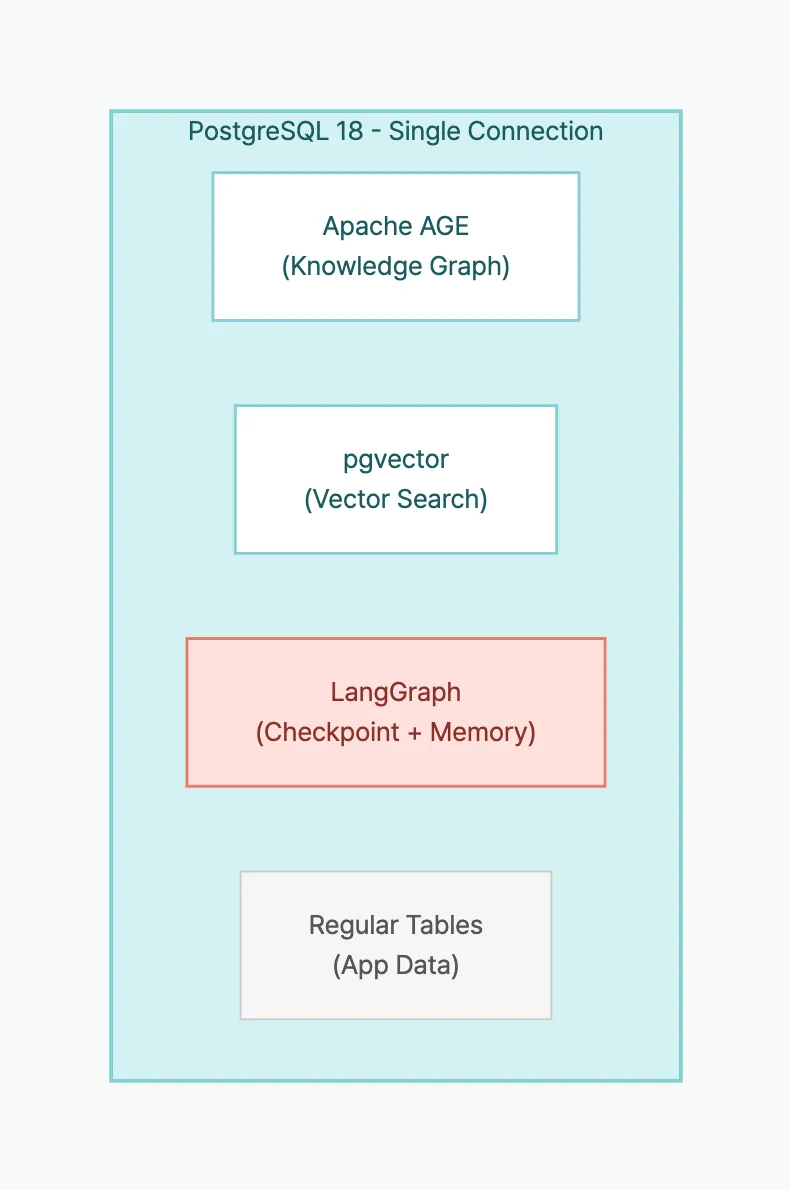
Graph + Vector + Checkpoint + Memory + App Data = 1 connection
Prerequisites
# Database
cd langchain-age/docker && docker compose up -d

# Packages
pip install "langchain-age[all]" langchain-openai langgraph langgraph-checkpoint-postgres
Architecture: Component Roles
| Component | Class | In PostgreSQL | Role |
|---|---|---|---|
| Knowledge graph | AGEGraph | AGE graph tables | Store entities and relationships |
| Vector search | AGEVector | pgvector table | Semantic similarity search |
| Checkpoints | PostgresSaver | checkpoints table | Save/restore conversation state |
| Long-term memory | PostgresStore | store table | Per-user preferences/history |
All four components share the same connection string.
Step 1: Shared Connection Setup
from langchain_age import AGEGraph, AGEVector
from langchain_openai import ChatOpenAI, OpenAIEmbeddings

# Single connection string shared by all components
CONN_STR = "host=localhost port=5433 dbname=langchain_age user=langchain password=langchain"

# Graph
graph = AGEGraph(CONN_STR, graph_name="agent_kg")

# Vectors
embeddings = OpenAIEmbeddings(model="text-embedding-3-small")
vector_store = AGEVector(
    connection_string=CONN_STR,
    embedding_function=embeddings,
    collection_name="agent_knowledge",
)

# LLM
llm = ChatOpenAI(model="gpt-4o-mini", temperature=0)
Step 2: LangGraph Checkpoint Setup
PostgresSaver stores the agent’s conversation state in PostgreSQL. Conversations can be resumed from where they left off, even after process restarts.
from langgraph.checkpoint.postgres import PostgresSaver

# Same connection string — no additional DB needed
checkpointer = PostgresSaver.from_conn_string(CONN_STR)
checkpointer.setup()  # Auto-creates checkpoint tables
With checkpointer.setup(), the agent’s conversation state is now persisted to PostgreSQL. Even if the process restarts or the server is replaced, the same thread_id is all you need to resume from the last turn.
Step 3: LangGraph Long-Term Memory Setup
PostgresStore stores information that persists across conversation sessions — user preferences, conversation summaries, etc.
from langgraph.store.postgres import PostgresStore

# Again, same connection string
memory_store = PostgresStore.from_conn_string(CONN_STR)
memory_store.setup()  # Auto-creates store tables

# Store user preferences
memory_store.put(("users", "user_001"), "preferences", {
    "language": "en",
    "expertise": "senior",
    "interests": ["graph-db", "rag", "llm"],
})

# Retrieve
prefs = memory_store.get(("users", "user_001"), "preferences")
print(prefs.value)
# {'language': 'en', 'expertise': 'senior', 'interests': ['graph-db', 'rag', 'llm']}
If checkpoints preserve “the flow of the current conversation,” long-term memory stores “facts that should survive across sessions.” Checkpoints lose relevance once a conversation ends, but long-term memory is referenced every time the user returns. Both live in the same PostgreSQL, but their roles are clearly distinct.
Step 4: Build a Knowledge-Growing Agent
We’ll create an agent that stores new information in a knowledge graph during conversation and uses both graph and vector search to answer questions.
Tool Definitions
from langchain_core.tools import tool

@tool
def add_knowledge(entity1: str, entity1_type: str,
                  relation: str,
                  entity2: str, entity2_type: str) -> str:
    """Add new knowledge to the graph. Use when the user shares facts or relationships."""
    # Create nodes (MERGE prevents duplicates)
    graph.query(
        f"MERGE (n:{entity1_type} {{name: %s}})",
        params=(entity1,),
    )
    graph.query(
        f"MERGE (n:{entity2_type} {{name: %s}})",
        params=(entity2,),
    )
    # Create relationship
    graph.query(
        f"MATCH (a:{entity1_type} {{name: %s}}), (b:{entity2_type} {{name: %s}}) "
        f"MERGE (a)-[:{relation}]->(b)",
        params=(entity1, entity2),
    )
    return f"Stored: ({entity1})-[{relation}]->({entity2})"


@tool
def search_knowledge(query: str) -> str:
    """Search the knowledge graph and vector store for relevant information."""
    results = []

    # Vector search
    docs = vector_store.similarity_search(query, k=3)
    if docs:
        results.append("=== Vector Search Results ===")
        for doc in docs:
            results.append(f"  - {doc.page_content}")

    # Graph search: list all relationships
    graph_results = graph.query(
        "MATCH (n)-[r]->(m) "
        "RETURN n.name AS source, type(r) AS rel, m.name AS target "
        "LIMIT 20"
    )
    if graph_results:
        results.append("=== Graph Relationships ===")
        for r in graph_results:
            results.append(f"  - ({r['source']})-[{r['rel']}]->({r['target']})")

    return "\n".join(results) if results else "No relevant information found."


@tool
def save_to_memory(user_id: str, key: str, value: str) -> str:
    """Save information to user's long-term memory."""
    memory_store.put(("users", user_id), key, {"value": value})
    return f"Saved to memory: {key} = {value}"


@tool
def recall_memory(user_id: str, key: str) -> str:
    """Recall information from user's long-term memory."""
    item = memory_store.get(("users", user_id), key)
    if item:
        return f"Memory: {key} = {item.value}"
    return f"No memory found for '{key}'."
Agent Graph Construction
from langgraph.prebuilt import create_react_agent

# Create agent — checkpointer maintains conversation state
agent = create_react_agent(
    llm,
    tools=[add_knowledge, search_knowledge, save_to_memory, recall_memory],
    checkpointer=checkpointer,
)
add_knowledge writes entities and relationships to the graph, search_knowledge queries both vector and graph stores simultaneously, and save_to_memory/recall_memory maintain per-user information across sessions. Together, these four tools create an agent that learns, remembers, and retrieves as it converses.
Step 5: Run the Agent
# Session config — thread_id identifies the conversation
config = {"configurable": {"thread_id": "session_001"}}

# Turn 1: Feed knowledge
response = agent.invoke(
    {"messages": [("user", "Alice is an NLP researcher and she leads the GraphRAG project. Remember that.")]},
    config=config,
)
print(response["messages"][-1].content)
# Agent calls add_knowledge to store in the graph

# Turn 2: More knowledge
response = agent.invoke(
    {"messages": [("user", "Bob is a senior engineer on Alice's team. He specializes in pgvector.")]},
    config=config,
)

# Turn 3: Query knowledge
response = agent.invoke(
    {"messages": [("user", "Who is on Alice's team? What projects are they working on?")]},
    config=config,
)
print(response["messages"][-1].content)
# Agent calls search_knowledge →
# "Alice's team includes Bob (senior engineer, pgvector specialist).
#  Alice leads the GraphRAG project."
Session Restoration
Thanks to the checkpointer, conversations survive process restarts.
# After process restart — same thread_id restores state
config = {"configurable": {"thread_id": "session_001"}}

response = agent.invoke(
    {"messages": [("user", "What was Alice's role again?")]},
    config=config,
)
# Checkpoint restores previous conversation state →
# "Alice is an NLP researcher who leads the GraphRAG project."
What Happens Inside PostgreSQL
As the agent runs, these tables coexist in PostgreSQL:
-- AGE graph tables (Apache AGE)
SELECT * FROM ag_catalog.ag_graph;
-- agent_kg graph: Researcher, Project, ... nodes and relationships

-- Vector table (pgvector)
SELECT count(*) FROM "agent_knowledge";
-- Embedding vectors + metadata

-- LangGraph checkpoints
SELECT * FROM checkpoints ORDER BY created_at DESC LIMIT 5;
-- Conversation state snapshots

-- LangGraph store
SELECT * FROM store WHERE namespace = '("users", "user_001")';
-- Per-user long-term memory
All backed up by the same pg_dump. All protected by the same PostgreSQL HA (Patroni/repmgr).
Actual Resource Usage
After running the agent through 100 conversations (average 5 turns/session):
| Item | Value | Notes |
|---|---|---|
| Graph nodes | 47 | Entities extracted from conversation |
| Graph relationships | 63 | Relations between entities |
| Vector records | 120 | agent_knowledge table |
| Checkpoints | 500 | 100 sessions × 5 turns |
| Store items | 85 | User memory entries |
| Total disk | ~12MB | pg_dump size |
| Max connections | 4 | Concurrent |
12MB — if you distributed this agent’s state across Neo4j + Redis + Pinecone, the minimum instance costs for 3 services would be $50+/month. On one PostgreSQL, the additional cost is $0.
Operational Benefits
Traditional Stack vs Unified PostgreSQL
| Aspect | Traditional (5 DBs) | Unified (1 PostgreSQL) |
|---|---|---|
| Connection strings | 5 | 1 |
| Backup pipelines | 5 | 1 (pg_dump) |
| Monitoring targets | 5 services | 1 (pg_stat_statements) |
| HA configuration | Different per service | 1 (Patroni) |
| Team expertise | Graph DB, Redis, Vector DB… | PostgreSQL DBA |
| Transaction consistency | Distributed transactions needed | Native ACID |
| Monthly cost (HA) | $15K+ (Neo4j alone) | $0 |
Performance Concerns Addressed
As validated in Part 2:
- 1-2 hop graph queries: AGE is 1.7-2.2x faster than Neo4j
- Single CREATE: AGE is 3.7x faster
- 6-hop deep traversal:
traverse()makes AGE 1.7x faster than Neo4j
The RAG agent workload (shallow graph queries + CRUD + vector search) falls squarely in AGE’s strength zone.
Lessons Learned
-
Don’t share connections. Initially we had AGEGraph and PostgresSaver share the same psycopg connection object — transaction conflicts ensued. Use the same connection string, but let each component create its own connection. That’s why the code above is structured the way it is.
-
Checkpoint tables grow fast. Just 100 sessions × 5 turns produced 500 records. In production, forgetting TTL cleanup means hundreds of thousands of rows per month. Set up a cleanup cron job immediately after
setup(). -
Validate tool label names. The LLM may pass “사람” (Korean) or “person” (lowercase) as
entity1_type, creating unintended graph labels. In production, either specify an allowed label whitelist in the tool description or map inputs to canonical labels inside the tool.
Production Checklist
Things to verify when running the unified stack in production:
| Item | Method |
|---|---|
| Connection pooling | PgBouncer in front |
| Vector indexes | store.create_hnsw_index() — see Part 3 |
| Graph indexes | graph.create_property_index() |
| Monitoring | pg_stat_statements + pg_stat_user_tables |
| Backup | pg_basebackup (physical) + pg_dump (logical) |
| HA | Patroni + etcd or repmgr |
| Checkpoint cleanup | TTL-based deletion of old checkpoints |
FAQ
Can I use langchain-age without LangGraph?
Absolutely. langchain-age is a standalone library. You can build GraphRAG with just AGEGraph + AGEVector. Add LangGraph only when you need agent state management.
Won’t concentrating load on one PostgreSQL be a problem?
PostgreSQL has decades of proven scaling methods:
- Read scaling: Streaming replication for read-only replicas
- Connection scaling: PgBouncer handles thousands of connections
- Storage scaling: Tablespaces to separate SSD/HDD
- Splitting: Move the vector table to a separate PostgreSQL if needed (still the same tech stack)
Scaling one PostgreSQL is operationally simpler than scaling Neo4j + Redis + Pinecone separately.
Won’t the checkpoint table grow unbounded?
Yes. In production, set up a cron job to clean old checkpoints: DELETE FROM checkpoints WHERE created_at < NOW() - INTERVAL '30 days'.
What’s the difference between LangGraph’s PostgresSaver and PostgresStore?
PostgresSaver stores conversation state (checkpoints) so that a conversation can resume from the last turn even if the process is interrupted. PostgresStore stores data that persists beyond any single session — user preferences, summaries, and other cross-session information. Both use the same PostgreSQL but serve different purposes: checkpoints are “the flow of this conversation,” while the store is “what to remember about the user.”
Can I join AGE graph data and pgvector results in the same query?
Direct SQL JOINs between AGE graphs and pgvector tables are not supported. Instead, use the pattern shown above: run vector search and graph search sequentially, then combine results. Since both searches execute inside the same PostgreSQL, they combine in milliseconds with no network overhead.
Is langgraph-checkpoint-postgres compatible?
langgraph-checkpoint-postgres>=2.0.0 uses psycopg3, and langchain-age is also psycopg3-based. They share the same driver with no dependency conflicts.
Key Takeaways
- A single PostgreSQL instance can run graph (AGE) + vector (pgvector) + checkpoints (PostgresSaver) + long-term memory (PostgresStore) simultaneously.
- One connection string, one pg_dump, and one Patroni HA setup covers backup and failover for the entire AI Agent infrastructure.
- The full state of a 100-session, 5-turn agent is roughly 12MB — one pg_dump backs up the graph, vectors, checkpoints, and memory together.
- PostgresSaver stores mid-conversation state for session restoration, while PostgresStore stores cross-session user data. Same PostgreSQL, different roles.
- Compared to a Neo4j + Redis + Pinecone stack, monthly operational cost is $0, and a single PostgreSQL DBA can manage the entire stack.
Series Summary
Across 5 posts, we covered everything langchain-age can do:
| Part | Topic | Key Takeaway |
|---|---|---|
| 1 | Overview + Setup | GraphRAG is possible without Neo4j |
| 2 | Benchmark | AGE is faster for 1-2 hop queries |
| 3 | Vector Search | Hybrid + MMR + Filtering |
| 4 | GraphRAG | Vector → Graph → LLM pipeline |
| 5 | Agent Stack | Full AI Agent on 1 PostgreSQL |
Conclusion: For most RAG/Agent workloads, PostgreSQL + Apache AGE + pgvector is enough. Instead of operating Neo4j + Pinecone + Redis separately, you can get the same results from the PostgreSQL you already know.
Related Posts
- GraphRAG with Just PostgreSQL — Part 1: Overview and Quick Start
- Neo4j vs Apache AGE Benchmark — Part 2: Performance Comparison
- Mastering Vector Search — Part 3: Hybrid, MMR, Filtering
- Building a GraphRAG Pipeline — Part 4: Vector + Graph Integration
External References
langchain-age is MIT licensed. Apache AGE is Apache 2.0. pgvector is PostgreSQL License. No license fees, no vendor lock-in.