TL;DR: DeepCoWork is an open-source AI agent desktop app built on Deep Agents SDK + Tauri 2, supporting 5 LLM providers and HITL approval for dangerous operations.
Table of contents
Open Table of contents
Why I Built This
When Claude Cowork launched, I thought: “I can build this as open source.” Anthropic’s Deep Agents SDK was already Apache 2.0, and Tauri 2’s sidecar feature could embed a Python backend into a desktop app. Four clear primitives stood out:
| Component | Role |
|---|---|
| Planning Tool | Task decomposition and priority management |
| Subagents | Domain-specialized isolated workers |
| Virtual Filesystem | Shared memory between agents |
| System Prompt | Behavioral guidelines for complex scenarios |
Building it myself means no model lock-in, local LLM support, and full control over prompts.
Architecture
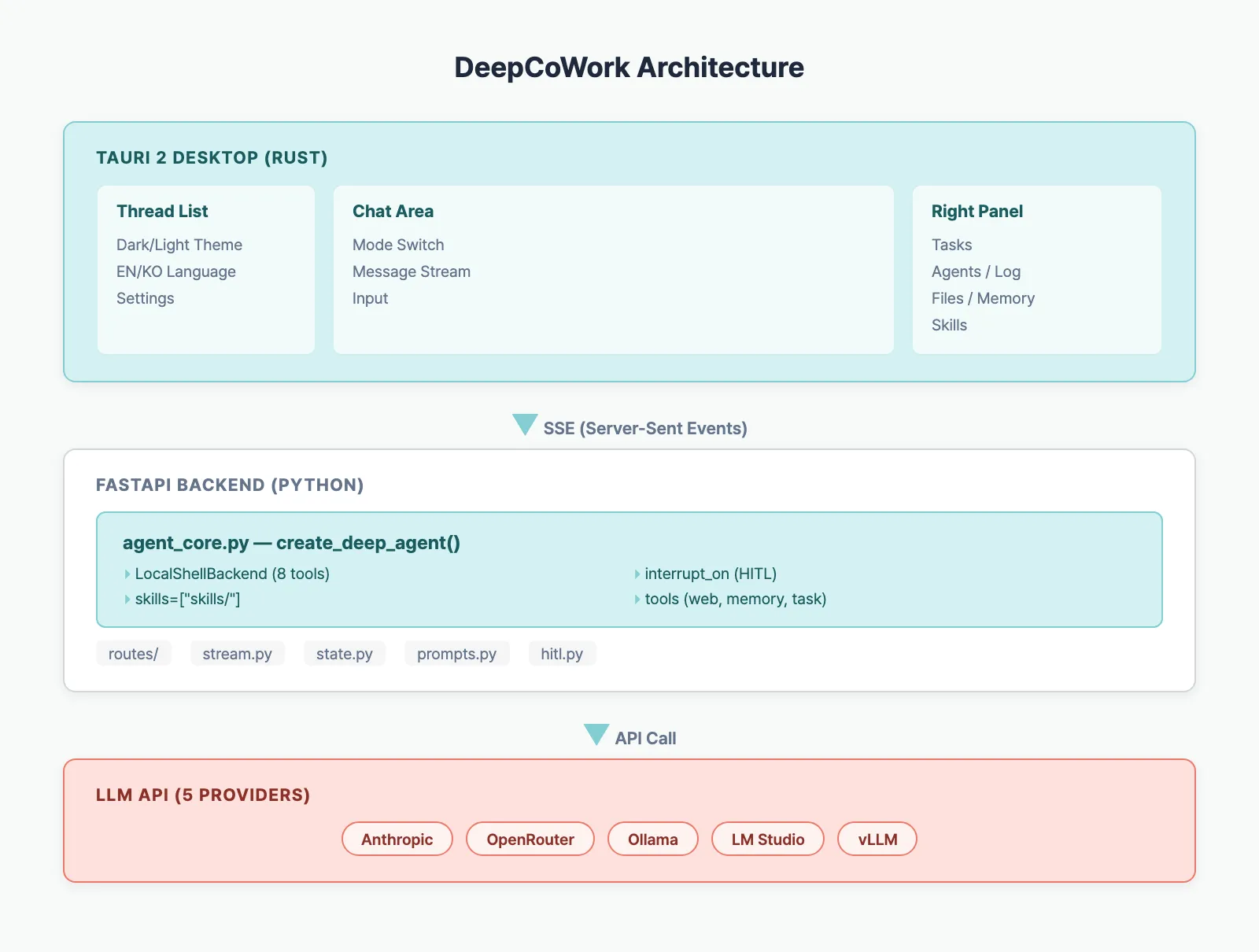
Three Layers
- Tauri (Rust) — Native window, Python process management, CSP security
- React (TypeScript) — Chat UI, SSE streaming, Zustand state
- FastAPI (Python) — Deep Agents SDK, LLM calls, tool execution, HITL
Tauri spawns the Python backend as a sidecar process, and the frontend receives real-time tokens via SSE.
Core Code: Agent Creation
The agent core lives in a single file — agent_core.py:
from deepagents import create_deep_agent
from deepagents.backends import LocalShellBackend

def build_agent(workspace_dir, checkpointer, mode, tools):
    llm = build_llm()  # picks from 5 providers

    backend = LocalShellBackend(
        root_dir=str(workspace_dir),
        virtual_mode=False,
        timeout=60,
        max_output_bytes=50_000,
    )

    return create_deep_agent(
        model=llm,
        tools=tools,
        backend=backend,
        interrupt_on={
            "write_file": True,
            "edit_file": True,
            "execute": True,
        },
        checkpointer=checkpointer,
        system_prompt=prompt,
        skills=["skills/"],
    )
What create_deep_agent() handles internally:
- LangGraph ReAct loop — model call → tool execution → repeat
- LocalShellBackend — 8 built-in tools:
read_file,write_file,edit_file,execute,ls,glob,grep,write_todos - interrupt_on — pauses execution before specified tools (waits for user approval)
- SkillsMiddleware — injects
SKILL.mdfiles into the system prompt via progressive disclosure
Key Features
4 Execution Modes
| Mode | Role | Behavior |
|---|---|---|
| Clarify | Requirements gathering | Investigates first, asks only essential questions |
| Code | Pair programming | Minimal changes, follows existing patterns |
| Cowork | Autonomous execution | Creates plan.md → executes step by step |
| ACP | Multi-agent | Delegates everything to sub-agents |
Human-in-the-Loop (HITL)
Dangerous operations like file writes and shell execution are never auto-executed:
Agent calls write_file → interrupt_on triggers
  → Frontend shows approval modal
  → User: Approve or Reject
  → Approved: execute tool
  → Rejected: agent finds alternative approach
30-second timeout with auto-reject — safe even if left unattended.
Skills System
Drop a SKILL.md file in ~/.cowork/workspace/skills/ and the agent gains new capabilities:
---
name: code-review
description: Performs systematic code review
allowed-tools: read_file glob grep execute
---

# Code Review Skill
## When to Use
- When the user requests a code review
...
The agent sees metadata first, reads full instructions only when needed (progressive disclosure).
5 LLM Providers
| Provider | Type | Model Selection |
|---|---|---|
| Anthropic | Cloud | Text input |
| OpenRouter | Cloud | Text input |
| Ollama | Local | Auto-fetched from server |
| LM Studio | Local | Auto-fetched from server |
| vLLM | Local | Auto-fetched from server |
Local providers auto-detect available models via /v1/models API.
Tech Stack
| Layer | Technology | Role |
|---|---|---|
| Desktop | Tauri 2 (Rust) | Window, process management, CSP |
| Frontend | React 19 + Zustand | UI, state management |
| Styling | Tailwind CSS 4 | Dark/Light theme |
| Backend | FastAPI + uvicorn | REST + SSE |
| Agent | Deep Agents SDK | ReAct loop, tools, HITL |
| LLM | LangChain | Provider abstraction |
| DB | SQLite (LangGraph) | Checkpointer, thread metadata |
| Build | PyInstaller + GitHub Actions | Cross-platform |
Install & Run
Download (Recommended)
Grab the installer for your OS from GitHub Releases:
- macOS:
.dmg - Windows:
.exe - Linux:
.AppImage
No Python installation needed — the agent server is bundled via PyInstaller.
Development Mode
git clone https://github.com/BAEM1N/deep-cowork.git
cd deep-cowork

cd app && npm install
cd ../agent && python -m venv .venv && source .venv/bin/activate
pip install -e .

echo "LLM_PROVIDER=openrouter" > .env
echo "OPENROUTER_API_KEY=sk-or-..." >> .env
echo "MODEL_NAME=anthropic/claude-sonnet-4-5" >> .env

cd ../app && npm run tauri dev
Series Preview
This series deep-dives into each layer of DeepCoWork:
- This post — Introduction & architecture overview
- Tauri + Python sidecar architecture
- Deep Agents SDK internals
- System prompt design per mode
- SSE streaming pipeline
- HITL approval flow
- Multi-agent ACP mode
- Agent memory 4 layers
- Skills system
- LLM provider integration
- Security checklist
- GitHub Actions cross-platform build
Source code: github.com/BAEM1N/deep-cowork
Benchmark
| Metric | Value |
|---|---|
| Tauri app binary (excluding sidecar) | ~12MB (macOS arm64) |
| PyInstaller sidecar binary | ~95MB (DeepAgents + LangChain + FastAPI) |
| Total .dmg installer size | ~110MB |
| Cold start (app launch to first chat ready) | ~4.2s (M1 Mac) |
| Idle memory usage | ~180MB (Tauri ~45MB + Python ~135MB) |
FAQ
How is DeepCoWork different from Claude Cowork?
Claude Cowork is Anthropic’s closed-source product. DeepCoWork uses the same Deep Agents SDK but is fully open-source (MIT), model-agnostic, and supports local LLMs.
Why Tauri over Electron?
Smaller binary (10MB vs 150MB+), lower memory usage, and Rust gives stable Python process management.
Why Deep Agents SDK instead of building with create_react_agent?
create_react_agent’s interrupt_before only accepts node names — not tool names — so per-tool HITL is impossible. DeepAgents’ interrupt_on supports fine-grained tool-level control, and LocalShellBackend provides 8 filesystem/shell tools out of the box.
Does it work with local LLMs?
Tested with Ollama + llama3.1 8B. Basic file operations work, but complex multi-agent tasks need Claude/GPT-4 class models.